 Splitlane
A native desktop app for CLI coding agents
See which agent is waiting for you.
Run Claude Code, Codex and 14 other CLI agents side by side, and see which one is waiting for you. For Claude Code and Codex, Splitlane reads the agent’s own records instead of guessing from the screen.
Rust on GPUINo accountTelemetry only if you opt inGPL-3.0-or-later
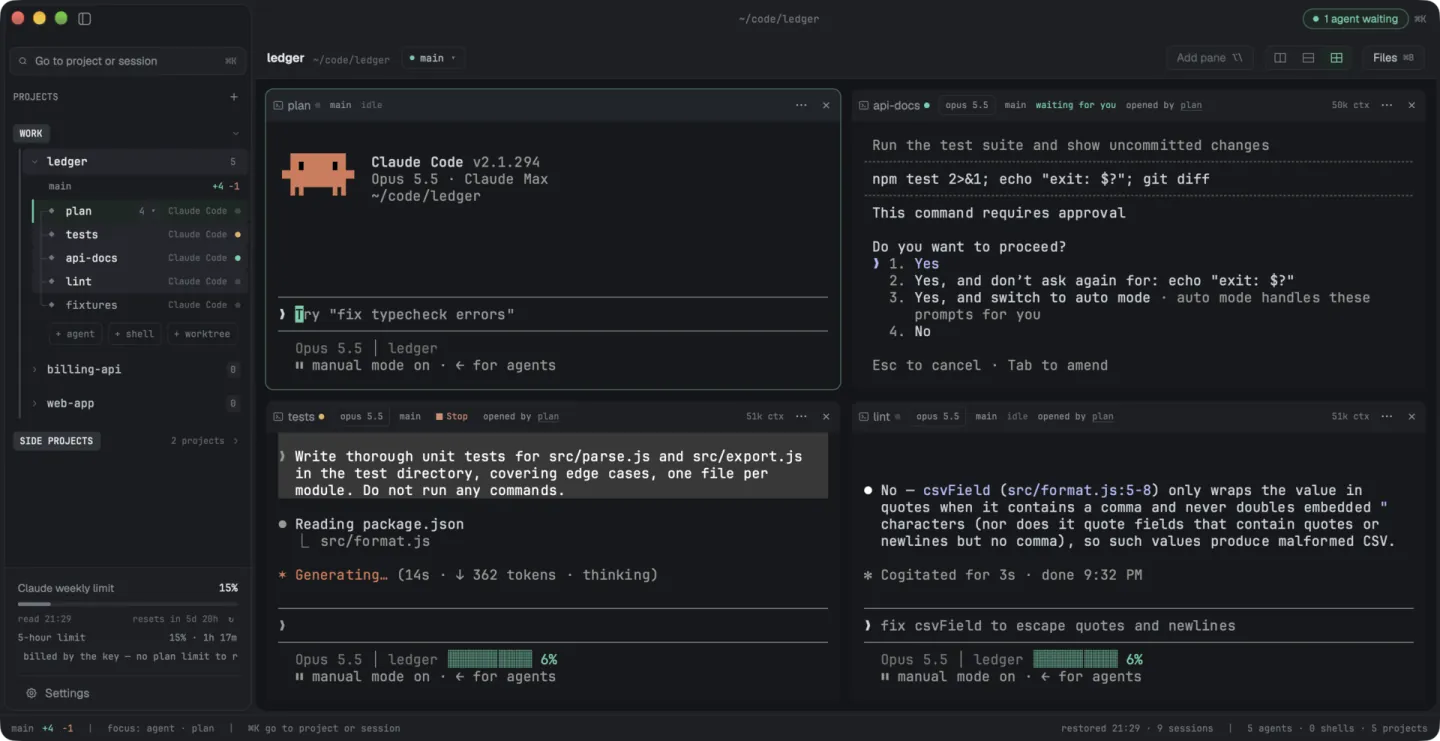
Three agents in one project. One is working, one has finished, and one is asking to run npm test. The rail, its pane header and the title bar all say so.
How it knows
Read from the agent, not from the screen.
A permission prompt and an idle prompt can look alike in a terminal. A status dot you cannot trust is worse than none, so each agent's state comes from the best source that agent offers, and Splitlane says which source that is.
- starting
- running
- waiting for you
- idle
- failed
The title bar counts who is waiting; the pane that needs you says so in its header.
-
Their own session records
Claude Code's status file and transcript, Codex's rollout, and the process tree under the pane. A permission prompt, a running tool call and a finished turn are told apart from what the agent recorded.
Claude Code, Codex
-
Hooks, for eight more
They report through hooks that a small shim on the pane's
PATHinstalls for the length of the session.Gemini, Cursor, OpenCode, Pi, Hermes Agent, Grok, CodeBuddy, Qoder
-
Only whether it runs, for the last six
They expose no hook surface Splitlane can use, so their row can say
runningwhile the agent is in fact waiting for you.Copilot, Kiro, Factory, Antigravity, Openclaw, Amp
What is in the window
Every agent in a real terminal, and the diff beside them.
A project's panes are a row, a column, or a grid of four. You answer an agent in its own terminal; there is no second approval UI to keep in sync.
The same project as a grid of four: the three agents and the diff of what they changed.
-
The rail
One list of projects, each expanding to its sessions with their status. ⌥⇥ jumps to the next session waiting for you.
-
Groups
Projects sit under named labels. Fold a group away, or keep its project names out of notifications.
-
A branch per session
In a git repository each agent session gets its own worktree and branch, so two agents never edit the same checkout, plus ten ports for a dev server.
-
Diff
The project's changes against its base branch, uncommitted and untracked files included, in a pane next to the agents that made them.
-
Hand an answer over
A session's last answer goes to another agent on screen, onto its input line; you press Enter.
-
Limits
Your Claude and Codex plan usage in the rail, with when it resets.
One agent working through others
An agent can open sessions of its own. You still see each one.
An agent in a pane can hand other sessions a task, wait for their turn to end, read the answer and close them. Each of those sessions is a row in the rail with a status you can see, and a question meant for you still reaches you.
One session and the four it opened. One is working, one is waiting for you.
-
Eight at most, one level deep
A session that was opened by another cannot open any, and it works in its opener's worktree.
-
A session you opened is yours
When an agent wants to send to one, nothing is written until you allow it, in that agent's own pane.
-
What an agent typed says so
Text one session sends another starts with a line saying it was sent by an agent session, not typed by a person.
Sessions outlive the window
Close the window. The agents keep working.
On macOS and Linux the terminals run in a separate process, the session host. Closing the window, an update or a crash of the window leaves every agent working, and the next start shows each one in its pane again.
Where a session does end, its conversation resumes on the next launch; a turn that was running does not. On Windows the sessions still live in the window's process.
Running (⌥⌘P) lists every agent and every command running in a shell, and stops the ones you mark.
Your phone
Answer a waiting agent from your phone.
A paired phone follows the agent sessions on the computer and answers them. There is no app to install from a store: it is a page at app.splitlane.dev that you add to the home screen.
-
The list is the rail's
It opens with Needs you: sessions waiting for an answer or failed. A permission prompt comes with its command, and each numbered choice is a button.
-
End-to-end encrypted
Neither side opens a port. The relay sees only that a message passed, its length and when. A phone writes only into agent sessions, never into a plain shell.
-
Pairing
Scan the QR code from Settings → Phone, then type on the computer the six digits the phone shows, so a photo of the code is not enough.


Next to its neighbours
The column it was built around.
Several tools put coding agents side by side. What sets them apart is how each one learns that an agent needs you. Taken from each project's own documentation as of October 2026; they change quickly.
| Tool | Where the agents run | How it learns an agent needs you | Platforms |
|---|---|---|---|
| Splitlane | Terminal panes in a desktop app, one git worktree per agent session | The agent's own session records for Claude Code and Codex, hooks for eight more; for the rest, only whether the process is alive | macOS, Linux; Windows from source |
| herdr | Panes inside the terminal you already use | Rules matched against what the agent draws on screen; hooks or the agent's own reports for some agents | Linux, macOS, Windows |
| cmux | Terminal panes in a native macOS app | Terminal notification sequences, a cmux notify command and hooks it installs | macOS |
| Conductor | Its own chat interface, one git worktree per workspace | Its documentation does not say | macOS; no new sign-ups since November 2026 |
Questions
Questions people ask first.
Why not tmux with one agent per pane?
tmux shows you the panes; it cannot tell you which agent is blocked on a question. If you work over SSH or want something headless, use tmux. Splitlane is for supervising agents on your own machine, where knowing who is waiting is the whole job.
Is it an Electron app?
No. It is Rust on GPUI, Zed's UI framework, rendering with Metal on macOS, Vulkan on Linux and DirectX on Windows.
Does it run agents for me, or in the cloud?
Neither. The agents are the CLIs installed on your machine, signed in with your own accounts, running in ordinary terminals. Splitlane never sends a prompt on its own.
An agent can send one to a session it opened itself, and to a session you opened only after you say it may. A paired phone writes what you type on it, and only into agent sessions.
Does it phone home?
Only if you opt in. Telemetry never includes terminal contents, paths or prompts, and SPLITLANE_NO_TELEMETRY=1 turns it off regardless of settings.
Its other connections: it asks GitHub for updates ("check_for_updates": false stops it), reads your Claude plan usage with the login Claude Code already stored, and, once you pair a phone, keeps a connection to the relay, which carries only encrypted messages.
Can other agents read my terminals?
Only agents you register with the read-only MCP bridge, and only to read. Output it hands to an agent is marked as untrusted content.
Install
Get Splitlane.
Download the file for your platform from the latest release. Splitlane is early: it is used daily on macOS (Apple Silicon); Linux and Windows are built and tested in CI but have had far less hands-on use.
| Platform | File | How |
|---|---|---|
| macOS (Apple Silicon) | .dmg, signed and notarized | Open the image and drag Splitlane to Applications, or run brew install --cask ivkan/splitlane/splitlane. Intel Macs are not built yet. |
| Debian, Ubuntu | .deb | sudo apt install ./splitlane-<version>-<arch>.deb |
| Fedora, openSUSE | .rpm | Import the signing key once, then install with dnf or zypper. Steps |
| Other Linux | .AppImage or .tar.gz | The AppImage runs as is after chmod +x; the tarball installs under ~/.local without sudo. |
| Windows | None yet | No signed installer yet; build from source. |
Linux builds need glibc 2.35 or newer and a Vulkan driver. Every file has a .sha256 and a minisign .minisig beside it. Splitlane checks for a newer version at startup and every four hours, and a click in the title bar installs it.